«SVL Simulator» Web app
A ground-up web platform for LG Electronics' LGSVL Simulator – the free, open-source autonomous-vehicle and robotics simulator used by developers building on Autoware and Apollo worldwide.
Project details
Start date
End date
Duration
Client
Role
Tools
Activities
Overview
The LGSVL Simulator is LG Electronics' free, open-source autonomous-vehicle and robotics simulator, built on Unity's HDRP rendering and designed to plug directly into the open AV stacks the industry had standardized on – Autoware and Apollo – over ROS/ROS2. It's made up of two connected applications: a web app – referred to internally as WISE – for creating, managing, and sharing simulations and assets, and a desktop app that runs and visualizes those simulations in real time, with camera, LiDAR, RADAR, GPS, and IMU sensor output. Assets in the platform – maps, vehicles, autopilots, sensors, runners, and scenarios – can be pulled from a shared public catalog or built and published by users themselves. Teams can also scale beyond a single machine by running simulations across a local or cloud cluster of desktop instances. In this case study, I'll walk through the process of designing the web application, from the first user interview to launch.
Problem
Autonomous-vehicle and robotics developers building on open stacks like Autoware and Apollo had no ready-made, high-fidelity simulator that worked with those stacks out of the box. Most teams either patched together their own simulation environments – custom Unity or Gazebo scenes, hand-built sensor models, manual ROS bridges – or relied on closed, proprietary tools that didn't integrate with the open-source stack their software actually ran on. An early survey of engineers across AV startups, robotics teams, and research labs found that assembling a single compatible test environment by hand – a map, a sensor configuration, and an Autoware or Apollo bridge – took close to two hours on average, before any real testing could start. There was also no supported way to distribute a simulation across more than one machine, which stalled larger test runs for any team without custom scripting of their own.
average time to hand-assemble one compatible test environment – map, sensor config, Autoware/Apollo bridge – before this platform existed
"We were rebuilding the same ROS bridge every time someone needed a new scenario. Nothing about it was reusable – it just lived in one engineer's head."
– early engineering survey respondent, AV startup
Business context
LG Electronics' R&D lab built LGSVL Simulator to close a gap in the wider AV industry, not to serve an internal team – the Autoware and Apollo ecosystems were both growing fast, but neither had a shared, high-fidelity simulator that worked with them natively. Releasing LGSVL Simulator as a free, open platform let LG support and help standardize tooling around those two stacks, and put the company in front of the fast-growing community of startups, universities, and independent developers building on them.
Research
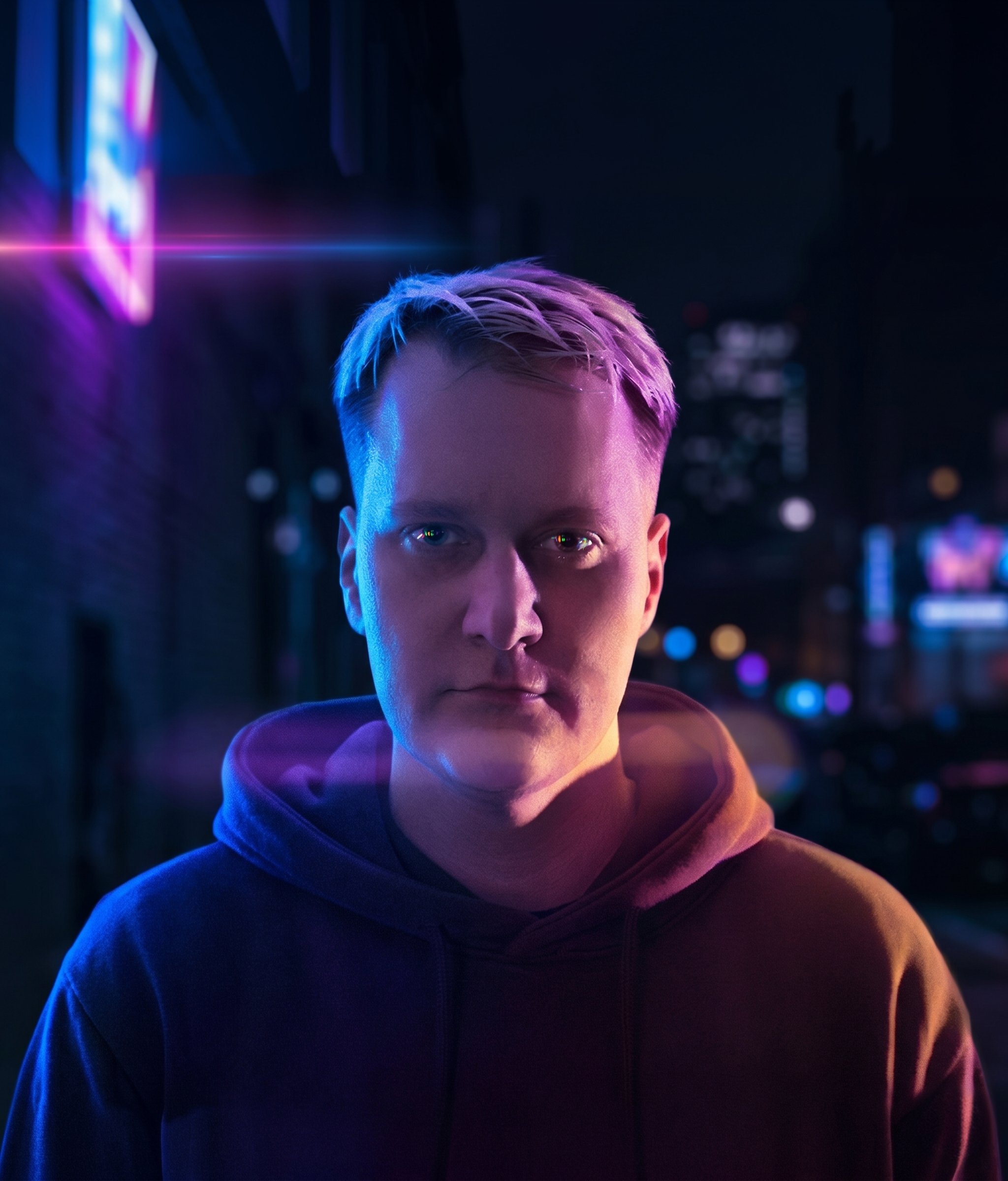
Since LGSVL Simulator didn't exist yet, there was no current product or usage data to start from – only developers already improvising their own simulation setups. To learn who'd actually use the platform and what they needed from it, I put together a questionnaire and sent it to 8 respondents – engineers at AV startups and robotics companies, plus a couple of university researchers, all already working with early, fragmented simulation tools. The goal was to find out where their current workflow broke down before deciding what the new information architecture should prioritize. Responses consistently pointed to the same gap: no existing tool covered the full lifecycle from building assets to reviewing results, and none of it was pre-integrated with Autoware or Apollo, so people were stitching together scripts, custom ROS bridges, and manual file transfers instead. I used the findings to build a primary persona, Thomas Anderson – an autopilot developer at an AV startup – and kept his goals and pain points as the reference point for every structural decision that followed.

User persona

Thomas Anderson
Autopilot Developer
Age
Education
Bio
Thomas lives in Los Angeles and works as a software engineer at an autonomous-vehicle startup, building the perception and planning stack on top of Autoware. He enjoys traveling, rock climbing, and watching movies, and always makes time to hang out with his two younger sisters. His favourite sports team is the Lakers.
Jobs
Autonomous vehicle autopilot development on the Autoware stack Communication with hardware engineers integrating new sensors
Drivers
Exploring cutting-edge technologies Approaching the future of personal vehicles
Wants & Needs
Possibility to simulate real-world environments Possibility to simulate real-world traffic scenarios Software to visualize simulations A way to run simulations remotely
Pain Points
No end-to-end simulation software that worked with Autoware out of the box No industry-standard technology stack to build on
Key insights
Design decisions
Information architecture
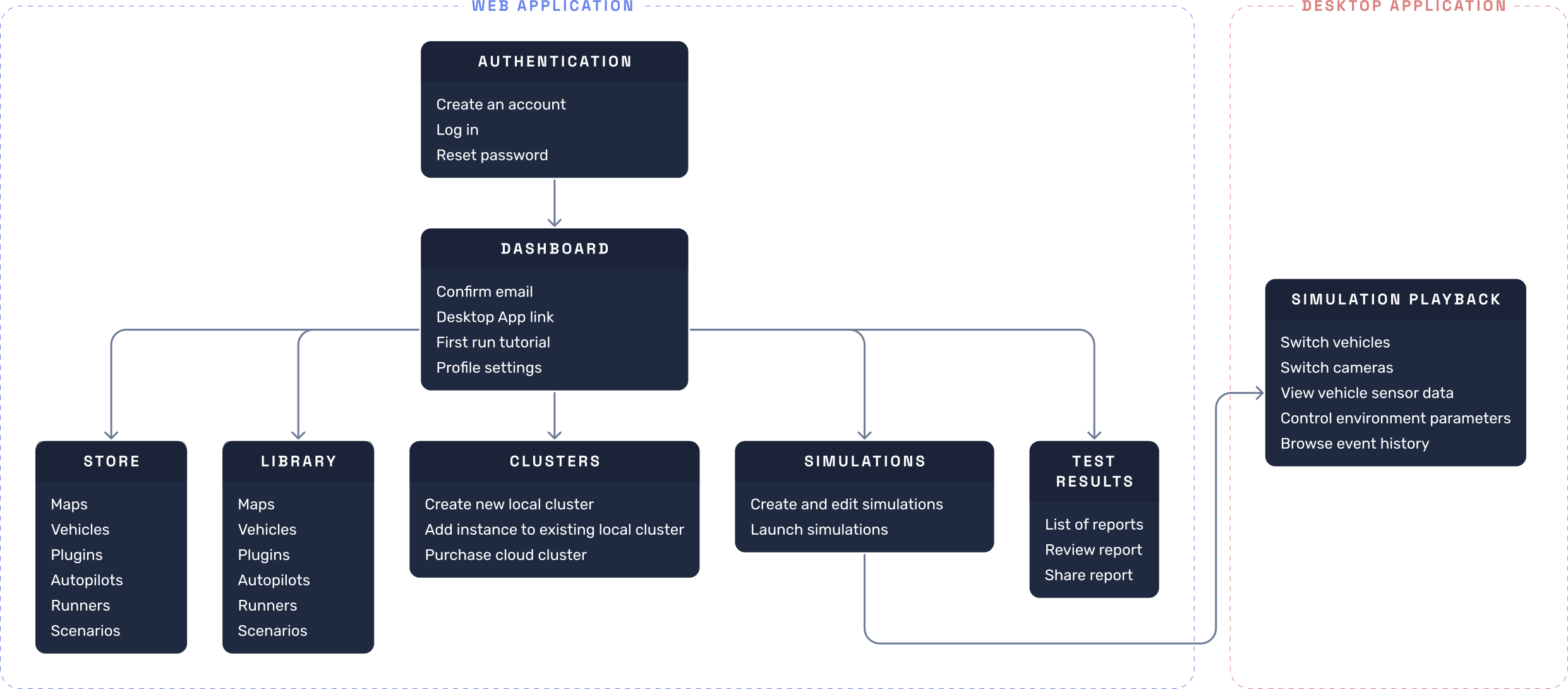
Everything above came out of the same research, so I mapped it onto one sitemap rather than treating each finding as a separate fix. The recurring complaint that no tool covered the full lifecycle – build, configure, run, review, share – meant that loop had to be visible as the spine of the whole structure, not buried inside one screen. The persona's own frustration with rebuilding assets from scratch each time, and the pattern of respondents already publishing their own vehicles and autopilots informally, is what split the Store from the Library: one shared, one owned. The pain point about no supported way to run distributed tests is what earned Clusters its own place in the hierarchy instead of a checkbox inside simulation setup. And the constraint that a simulation has to be created on the web before it can run on the desktop is what anchors the whole map to the web app as the source of truth. Since nothing like this platform existed before, there was no legacy structure to extend – this diagram is what came out of turning eight questionnaire responses into a sitemap from a blank page.
Design
With the information architecture in place, I moved from structure into individual screens, designing Store, Library, Clusters, Simulations, Test Results, and onboarding one at a time rather than all at once, so each could be checked against the insights and decisions above before I moved on to the next. Since this was the first UI the platform would ever have, there was no existing component library to draw from either – so a design system was built in parallel with the screens themselves, not retrofitted afterward. Typography, color, spacing, and the core components got established early, on the first couple of screens, and then extended as later screens surfaced new needs. That parallel effort is a big part of why Clusters and Test Results, designed later, came together faster than Store and Library did – by then, most of the system they needed already existed.
User flows • Authentication
Authentication
The entry point is a straightforward login screen. New users land on a guided onboarding flow that takes them from account creation to a first running simulation in five steps. The Profile page covers account management, including an Advanced section with Docker Registry credentials and CLI authentication tokens for teams integrating the simulator into CI/CD pipelines. The walkthrough covers signing in, completing onboarding, and locating the advanced credentials.
Screens • Authentication
Authentication
Outcome
Since this was the first dedicated, Autoware/Apollo-compatible simulation platform available to the wider AV and robotics developer community, success wasn't measured against a previous version of the product – it was measured against the ad hoc process it replaced, and against adoption in the months after launch.
Launch adoption
172 community assets published to the Store, 40% of them user-uploaded through the Library → Store loop – validating that publishing needed to live inside the same flow as building.
38% of active teams ran at least one simulation across a Cluster, confirming distributed testing was a real, not theoretical, need.
Platform NPS from the first quarterly survey landed at 34 – comfortably above the low-teens benchmark typical for early-stage developer tools, driven mainly by the onboarding flow and cluster management experience.
"For the first time, I didn't have to write my own bridge code before I could even start testing my planner. I went from signup to a running simulation in one sitting."
– NPS survey respondent, robotics team lead
Together, these numbers confirmed the core bet behind building the platform: that one well-structured, stack-compatible tool would beat a fleet of one-off scripts, both for individual setup time and for how much the developer community reused and shared each other's work.