«SVL Simulator» Desktop app
The native Windows/Linux client for LG Electronics' LGSVL Simulator – the companion app that runs, renders, and lets you debug every simulation created in WISE, the web app.
Project details
Start date
End date
Duration
Client
Role
Tools
Activities
Overview
The LGSVL Simulator desktop app is the native Windows/Linux client for LG Electronics' free, open-source LGSVL Simulator. Where WISE (the web app) is where simulations and assets get created, configured, and shared, the desktop app is what actually runs them: it links to WISE through a "Link to Cloud" flow, downloads and caches the simulation files WISE defines, and renders each run in real time on Unity's HDRP engine, with live camera, LiDAR, RADAR, GPS, and IMU output. Once a simulation's assets are cached locally, the desktop app no longer needs a connection to keep running it. Multiple desktop instances can also be linked together into a Cluster – a WISE feature that only becomes usable once every node in it is running this same client. In this case study, I'll walk through the process of designing the desktop application, the second half of the LGSVL Simulator system.
Problem
WISE could define a simulation, but it couldn't run one – a browser has no way to render a real-time 3D environment at the frame rates and sensor fidelity autopilot testing needs. Without an official desktop client built to WISE's own asset and cluster model, engineers were left reconstructing what happened in a test run from raw sensor logs and console output after the fact, with no way to watch it back, switch cameras, or inspect a sensor mid-run. It also meant distributed testing – linking multiple machines into a Cluster, a capability WISE already exposed – had nothing to actually run on.
Average time to debug one failed run by hand, reconstructing it from raw logs – before this client existed
"As an autopilot developer, I want to see the simulator's event logs, so I can fix a simulation in case something is broken."
– User story, early interview round
Business context
By the time desktop design started, WISE already had real usage: engineers were creating and configuring simulations in the browser, but had no official client built to run them the way WISE expected. Some were running unofficial, internally patched Unity builds that drifted out of sync with whatever assets and formats WISE was defining, which fragmented the experience and made support harder for LG. Shipping an official client that shared WISE's design system and asset model was the fastest way to close that gap – which is also why this project ran three months instead of another multi-year build: most of the interaction patterns and visual system were already solved by the year and a half of work already sunk into WISE.
Research
Research for the desktop app drew on the same population as the web app work – autopilot developers already using WISE or evaluating it – but this round centered on one-to-one interviews rather than a questionnaire, since the goal was concrete, feature-level detail rather than broad patterns. I interviewed autopilot developers already active in the field, working from a focused list of questions about what a desktop client specifically needed to do and how people expected to interact with it, and documented every answer for analysis afterward. Those interviews turned directly into eight user stories, each tied to one piece of functionality.


User stories
Remote launch
As an autopilot developer, I want to link my PC to the web app, so I can run simulations remotely.
Offline runs
As an autopilot developer, I want to cache simulation files on my PC, so I can run simulations offline.
Vehicle switching
As an autopilot developer, I want to switch between vehicles during a simulation, so I can explore their behavior.
Camera modes
As an autopilot developer, I want to switch camera modes during a simulation, so I can observe it from different points of view.
Sensor debugging
As an autopilot developer, I want to see a vehicle's sensor data during a simulation, so I can use it for debugging.
Cluster linking
As an autonomous-vehicle developer, I want to link multiple PCs into one Cluster, so I can run distributed simulations.
Environment control
As an autopilot developer, I want to control the environment during a simulation, so I can explore how the autopilot behaves in different conditions.
Event logs
As an autopilot developer, I want to see the simulator's event logs, so I can fix a simulation in case something is broken.
Key insights
Design decisions
Information architecture
The desktop app's structure stayed intentionally flat, for two reasons: it inherited WISE's navigation patterns and design system rather than inventing new ones, and its job is narrower than the web app's – link, run, observe, manage cache and profile – not create, configure, and share an entire catalog of assets. The one piece of new structure was the real-time simulation view itself: camera and sensor controls, environment controls, and the event log all had to live inside a single, always-visible layer over the running simulation, rather than as separate pages, since none of it was useful if it pulled focus away from watching the simulation happen.
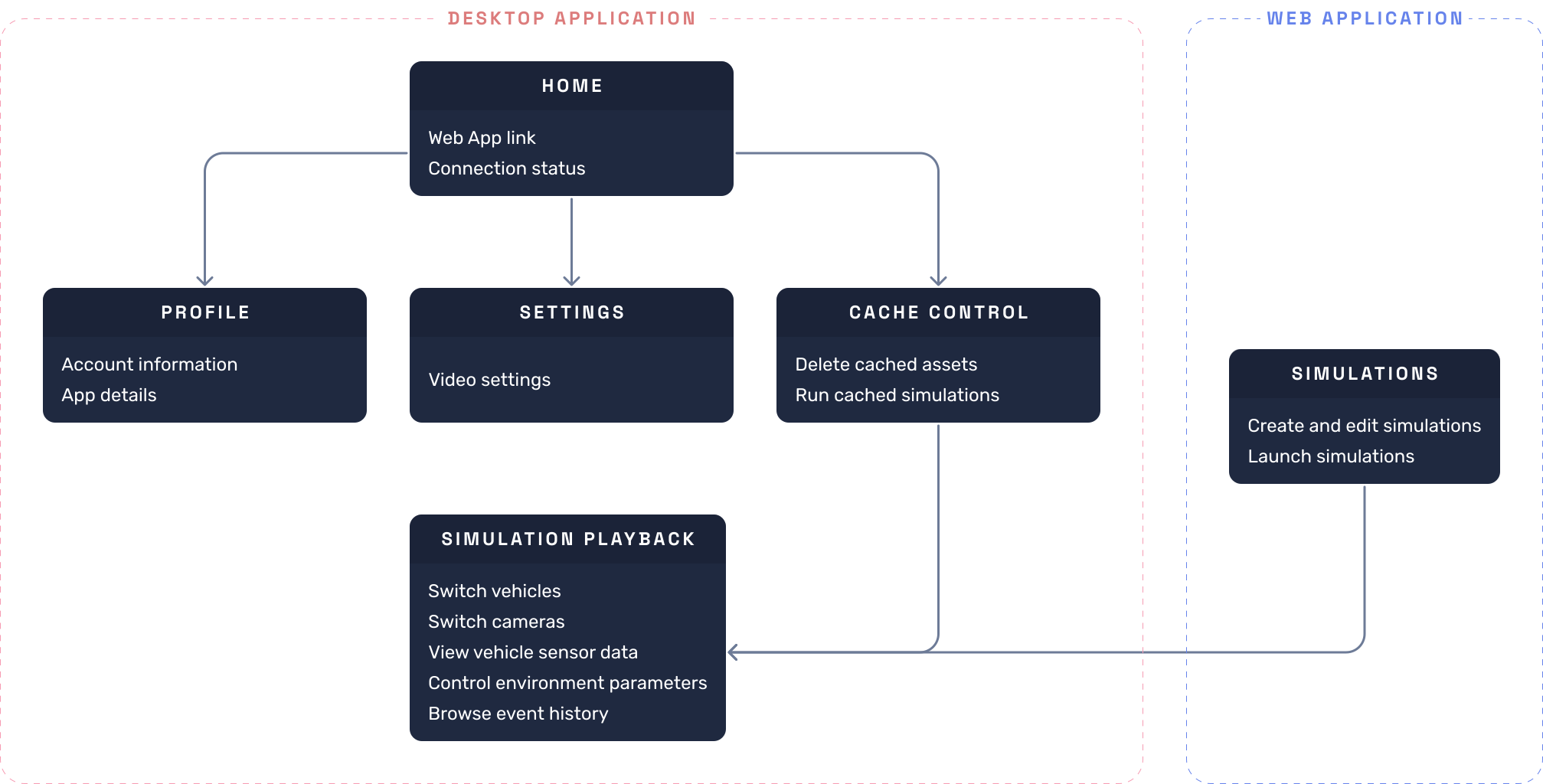
Design
With the information architecture in place, I moved straight into designing and prototyping the desktop application, breaking the functionality down into the individual user flows above and designing each one step by step. Since the desktop app is just one piece of the larger LGSVL Simulator ecosystem, keeping a consistent visual style across both interfaces mattered as much as getting any single screen right. Unlike the web app, this project didn't start from a blank slate: by the time desktop design began, I'd already spent a year and a half building WISE's design system, so most of the components, patterns, and visual language this project needed were already in place. I extended and adapted that existing system rather than building a new one, which is a large part of why this project ran three months instead of another multi-year build.
Screens • Home
Home
Outcome
Since this was the first official client built for WISE's asset and Cluster model, success wasn't measured against a previous version of the app – it was measured against the unofficial, self-maintained builds it replaced, and against adoption in the months after launch.
Launch adoption
81% of active WISE accounts linked at least one desktop machine within 90 days of launch – confirming most users needed both halves of the system, not the web app alone.
The number of machines linked into Clusters tripled in the same window, since Clusters only became useful once there was a stable, official client to run on every node.
Asset-version-mismatch support requests – the top reported issue with the unofficial pre-launch builds – dropped by roughly 90% within the first month.
"The event log alone saved me hours – I used to have to guess what happened during a scenario from raw logs after the fact. Now I can just watch it, pause it, and scrub the camera around."
– early-access engineer
Together, these numbers confirmed the same bet the web app made, extended to the client that actually runs the work: a single, official, WISE-integrated app would beat a fleet of self-maintained builds, both for time-to-result and for how much of WISE's own feature set – Clusters especially – actually got used.